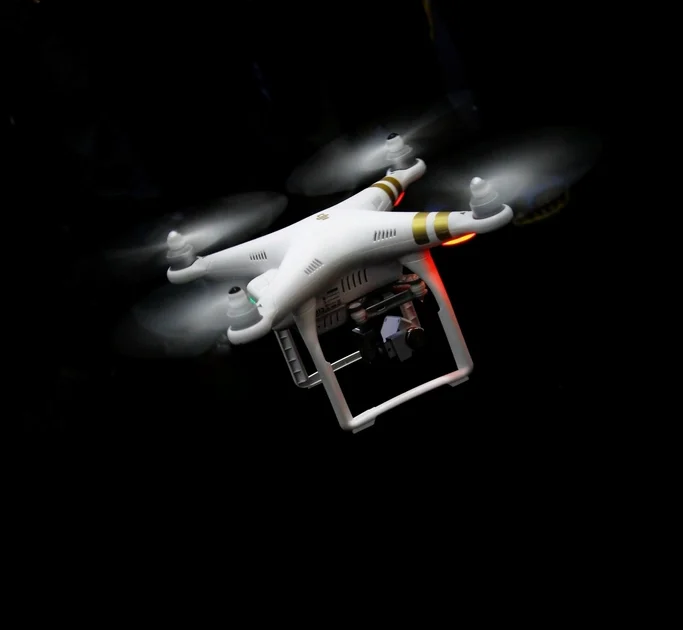
Quick Verdict: Learning to fly a drone safely takes one to three days of focused practice for a competent beginner. The control mechanics are straightforward; the learning curve is mostly about building muscle memory, understanding how the drone responds to wind, and internalizing the legal requirements before your first flight. This guide walks every step from unboxing to flying confidently. For buying advice first, see How to Choose a Drone and the Best Drones overview.
Before You Fly: The Pre-Flight Checklist
The single most important habit you can build as a new drone pilot is a consistent pre-flight check. Skipping this is how crashes happen on the first flight.
- Complete the FAA TRUST test: Required for all recreational flyers in the US. Free, online, takes 20–30 minutes. You must carry proof of completion while flying. See Drone Laws & Registration in the US.
- Register your drone if required: Drones over 250 g require FAA registration ($5). Mark your registration number on the drone’s exterior.
- Check airspace: Open the FAA B4UFLY app or Aloft on your phone. Confirm you’re in Class G uncontrolled airspace, or have LAANC authorization. Never skip this step.
- Charge all batteries fully: Cold or partially charged batteries fly shorter and respond less predictably. Start with a full charge every session.
- Inspect the drone: Check propellers for cracks or chips. Even a small nick on a prop creates vibration that affects video and stability. Replace damaged props before flying.
- Update firmware: Open the DJI Fly or equivalent app and check for firmware updates on both the drone and controller. Fly on current firmware — updates frequently fix stability and safety issues.
- Check the weather: Wind under 15 mph is comfortable for beginners. Most mid-range drones can handle up to their rated wind resistance, but beginners should start in calm conditions. Avoid rain entirely.
- Enable Return to Home (RTH): Set your RTH altitude in the app to clear any obstacles near your launch point (at minimum 50–100 feet). This is your safety net if signal is lost.
Understanding the Controls
Most drones use a two-stick controller. The left stick controls altitude and rotation (yaw); the right stick controls horizontal movement (pitch and roll). On Mode 2 — the most common default mode worldwide — the layout is:
| Stick | Direction | Drone Action |
|---|---|---|
| Left | Up | Climb (increase altitude) |
| Left | Down | Descend (decrease altitude) |
| Left | Left | Rotate counterclockwise (yaw left) |
| Left | Right | Rotate clockwise (yaw right) |
| Right | Up | Fly forward (pitch forward) |
| Right | Down | Fly backward |
| Right | Left | Strafe left (roll left) |
| Right | Right | Strafe right (roll right) |
The most common beginner confusion: when the drone is facing toward you, left and right on the right stick are reversed from your perspective. This is “orientation confusion” — the drone moves from its perspective, not yours. Most modern drones have a GPS-based heading lock that partially mitigates this, but building the mental habit of always knowing which way your drone is pointed is fundamental.
Step 1 — First Hover: The Fundamental Drill
Your first flying session should be nothing but hovering at 5–10 feet altitude in a large, clear open area (no trees, no people, no power lines). The goal is not to go anywhere — it is to hold a stable hover, practice tiny inputs, and get comfortable with how the drone responds.
- Place the drone on flat ground. Power on the drone, then the controller (or simultaneously — check your drone’s specific procedure).
- Wait for GPS lock — usually indicated by a solid green or blue light on the drone and a GPS icon in the app. Do not take off without GPS lock unless you intend to fly in ATTI mode (not recommended for beginners).
- Arm the motors by holding both sticks to the lower-inside position for 2–3 seconds, or use the app’s on-screen takeoff button.
- Gently push the left stick up to take off. Stop pushing and center the stick at 5–10 feet. The drone should hover in place.
- Practice tiny inputs: nudge the right stick slightly in each direction, return to center, let the drone stabilize. Do this for 5–10 minutes before attempting to fly anywhere.
- Land: slowly push the left stick down until the drone settles on the ground. Most drones auto-disarm once they detect landing.
Step 2 — Basic Maneuvers to Practice in Order
- Forward and back: Fly forward 20 meters, stop, fly back to start. Repeat until smooth.
- Left and right strafe: Fly sideways 20 meters, stop, return. This is lateral movement with the drone facing the same direction throughout.
- Rotation (yaw): Hover in place and slowly rotate the drone a full 360 degrees using only the left stick left/right. Practice until you can maintain position while rotating.
- Box pattern: Fly a square — forward, right, back, left — at constant altitude. This combines all basic inputs and builds the habit of smooth, deliberate control.
- Flying toward yourself: Face the drone toward you at 10 meters distance and practice flying it in a straight line back to the launch point. This builds orientation awareness.
- Figure-8: Once the box feels comfortable, practice figure-8 patterns that require continuously combining yaw with pitch and roll. This is the classic benchmark drill for beginner graduation.
Step 3 — Understanding Flight Modes
Most consumer drones (DJI Fly app, Autel Sky app) offer three flight modes:
- Normal (N) mode: Full GPS assistance, speed limited to a moderate cap. This is your default mode for learning and general flying.
- Sport (S) mode: GPS-assisted but faster, more responsive, obstacle avoidance reduced or disabled. Not for beginners.
- Cine mode (or Slow mode): Reduced speed and dampened stick response. Excellent for capturing smooth cinematic footage, and a good safe mode for beginners who want slow, deliberate control.
Start in Normal mode. Graduate to Cine mode for video capture. Reserve Sport mode until you have at least 10–20 hours of comfortable flight time.
Step 4 — Intelligent Flight Modes (Beginners’ Shortcut)
Most mid-range and premium drones include automated flight modes that can help beginners capture cinematic shots without manual precision. The most useful for new pilots:
- QuickShots (DJI): Pre-programmed cinematic movements — Dronie (fly backward and up), Rocket (ascend vertically), Circle (orbit a subject), Helix (spiral outward). The drone executes the maneuver automatically. These produce impressive results immediately.
- ActiveTrack (DJI): The drone tracks a moving subject — person, car, animal — and follows them while keeping them in frame. Useful for action sports.
- Point of Interest / Orbit: Set a GPS point, and the drone orbits it automatically at a chosen radius and altitude. Great for architectural and landscape shots.
- Hyperlapse: Time-lapse modes where the drone moves along a path while capturing frames for a sped-up video clip.
These modes are valuable tools, not shortcuts. Use them for content production, but build manual flying skills independently — you’ll need manual control when conditions change or automation reaches its limits.
Step 5 — Safe Flying Habits
- Always keep the drone in visual line of sight. FAA rules require it. Beyond line of sight, you also lose situational awareness of what the drone is near.
- Never fly over people or moving vehicles — this is an FAA rule and a basic safety principle.
- Fly below 400 feet AGL (above ground level) in uncontrolled airspace. This is the standard recreational ceiling.
- Monitor battery throughout the flight. Land when the battery hits 30% or when the app issues a low-battery warning — whichever comes first. Never push a battery to the emergency reserve; it shortens battery life and increases the risk of an emergency landing.
- Watch for wind at altitude. Ground level may feel calm; at 150–300 feet it can be significantly windier. If the drone’s tilt angle increases noticeably to maintain position, the wind is at or approaching its limit.
- Know your Return to Home procedure. Practice manually triggering RTH so you can do it without thinking in an emergency.
Common Beginner Mistakes to Avoid
| Mistake | Why It Happens | How to Avoid |
|---|---|---|
| Taking off without GPS lock | Impatience | Wait for solid GPS indication before arming |
| Flying with a partially charged battery | Skipping pre-flight | Always start a session with a full battery |
| Orientation confusion (mirrored controls) | Drone facing toward pilot | Practice the “flying toward yourself” drill daily |
| Flying in Sport mode too early | Excitement / temptation | Stay in Normal mode for the first 10+ sessions |
| Ignoring the low battery warning | Not wanting to end the session | Land at 30% — no exceptions |
| Flying near trees “because obstacle avoidance” | Over-reliance on sensors | Obstacle avoidance has blind spots; branches are thin |
Frequently Asked Questions
How long does it take to learn to fly a drone?
Basic competent flight — hovering, directional control, landing smoothly — takes most beginners 2–5 hours of practice. Flying confidently for photography or video, including handling wind and making smooth movements, typically takes 10–20 hours of accumulated flight time spread over several sessions.
Do I need a simulator before flying a real drone?
Not necessarily, but flight simulators (Liftoff, DRL Simulator, Velocidrone) are genuinely useful for FPV flying where the consequences of mistakes are more severe. For GPS-stabilized camera drones like the DJI Mini 4 Pro, the built-in assistance systems are forgiving enough that jumping straight to the real thing is common and reasonable. Practicing with the DJI Fly app’s simulation mode first takes only 15–20 minutes and is worthwhile.
What should I do if the drone flies away and I lose control?
Trigger Return to Home immediately — there is usually a dedicated RTH button on the controller. If that doesn’t work, put both sticks in the center (neutral) position; GPS-stabilized drones will hover in place rather than continuing to drift. Familiarize yourself with the emergency stop procedure in your specific drone’s manual before your first flight.
Is it hard to fly in wind?
Consumer drones are rated for maximum wind speeds — the DJI Mini 4 Pro handles winds up to about 10.7 m/s (Level 5 winds, ~24 mph). In practice, beginners should fly in winds under 15 mph until they’re comfortable. Wind at altitude is always stronger than wind at ground level. If the drone is working hard to hold position, land and wait for better conditions.