Let’s cut to the chase. For years, the DJI Mini series has been the go-to recommendation for anyone wanting to dip their toes into the world of drones without the regulatory headaches. They’ve always been about packing as much punch as possible into a tiny, sub-250g package. With this comprehensive Dji Mini 4 Pro Review, we’re going to find out if DJI has finally perfected the formula. Is this not just a great beginner drone, but potentially the only drone most people will ever need?
The promise is tantalizing: pro-level features in a drone that you can launch almost anywhere. But does the reality live up to the hype? I’ve spent weeks putting this little powerhouse through its paces—flying it in tricky winds, testing its camera in golden hour light, and pushing its new “look-at-me” features to their limits. So, grab a coffee, and let’s dive deep into what makes the Mini 4 Pro tick.
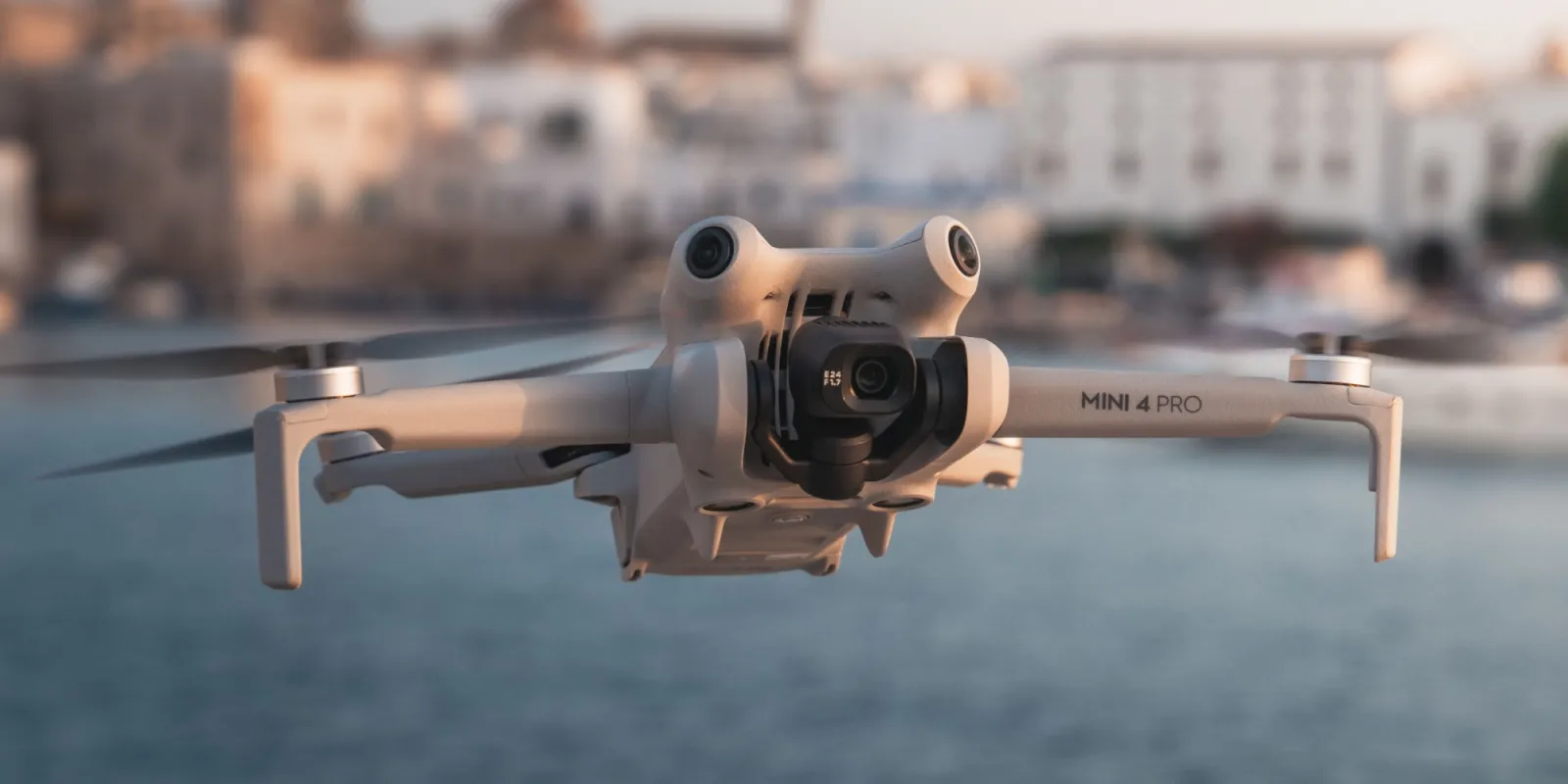
What’s The Big Deal? Key Upgrades Over its Predecessors
If you’re coming from a Mini 2 or even a Mini 3, you might be wondering if the upgrade is worth it. DJI didn’t just slap a “4” on the box and call it a day. The changes here are significant and genuinely improve the flying experience, especially when it comes to confidence and creativity.
True 360° Obstacle Avoidance: Finally, Peace of Mind
This is, without a doubt, the single biggest upgrade. The Mini 4 Pro now has omnidirectional obstacle avoidance, meaning it has sensors covering every angle—front, back, sides, top, and bottom. Think of it as giving the drone eyes on the back of its head.
For new pilots, this is a game-changer. I remember the heart-stopping feeling of my first drone drifting sideways towards a tree. With the Mini 4 Pro, the drone simply stops or intelligently flies around the obstacle. It doesn’t make you invincible, but it dramatically lowers the stress of flying in complex environments like a park with scattered trees or a narrow alleyway. This feature alone makes this DJI Mini 4 Pro review a much more positive one than for its less-aware ancestors.
A Smarter Camera System: It’s Not Just About Pixels
The sensor is largely the same fantastic one from the Mini 3 Pro, but the processing and software behind it have received a serious boost.
- ActiveTrack 360°: This is just plain cool. You can now draw a path for the drone to follow while it keeps the subject perfectly in frame. It can circle you, fly out and back, and perform complex maneuvers that used to require serious piloting skill. It’s incredibly intuitive and unlocks truly cinematic shots for solo creators.
- 4K/100fps Slow Motion: While the Mini 3 Pro had great video, the ability to shoot in buttery-smooth 4K slow motion adds a whole new level of creative potential for capturing action or dramatic scenes.
- 10-bit D-Log M Color: For the more serious videographers, this is huge. It provides a flat color profile that captures a massive amount of color information, giving you incredible flexibility when color grading in post-production. Your footage will look richer and more professional.
OcuSync 4.0 Transmission
Ever had that terrifying moment when your drone’s video feed starts to stutter? OcuSync 4.0 (O4) provides a rock-solid connection up to 20km (though you should always keep your drone within visual line of sight). In practical terms, this means a crystal-clear, lag-free video feed, even when flying behind buildings or trees. It’s like having a super-strong, invisible leash connecting you to your drone.
As our in-house aerial expert, Alex Hartman, puts it, “The Mini 4 Pro isn’t an incremental update; it’s a foundational shift. By bringing flagship-level safety and tracking features to the sub-250g class, DJI has democratized high-end aerial cinematography. It’s a remarkable piece of engineering.”
How Does the DJI Mini 4 Pro Fly in the Real World?
Specs on a page are one thing, but how does it feel in the air? In a word: stable. Despite its tiny size, it handles moderate wind surprisingly well. You’ll see it twitch and fight the gusts, but the footage remains impressively smooth thanks to the 3-axis gimbal.
For this DJI Mini 4 Pro review, I took it to a coastal cliffside on a breezy day, a scenario that would have terrified me with older, less capable drones. The Mini 4 Pro held its position beautifully, allowing me to focus on getting the shot instead of worrying about getting blown into the sea.
The controls are responsive and intuitive, especially with the DJI RC 2 controller that has a built-in screen. For a beginner, the learning curve is incredibly gentle. You can be up in the air and capturing stunning footage within minutes of unboxing.
Who Is This Drone Actually For?
This is the most important question. Depending on who you are, the Mini 4 Pro is either the perfect drone or slight overkill.
For the Absolute Beginner?
Yes. 100%. The combination of its light weight, simplified regulations, and, most importantly, the new 360° obstacle avoidance makes it the safest and most confidence-inspiring drone for a first-time pilot.
For the Travel Vlogger or Content Creator?
Absolutely. Its portability is unmatched. You can toss it in any backpack. The ability to shoot true vertical video for platforms like Instagram and TikTok without losing quality is a massive workflow advantage. The intelligent flight modes like ActiveTrack 360° let you get epic shots of yourself without needing a second operator.
Is It Worth Upgrading From a Mini 3 or Mini 3 Pro?
This is a tougher call. The Mini 3 Pro is still an excellent drone. The decision to upgrade really comes down to one key feature: obstacle avoidance.
| Feature | DJI Mini 3 Pro | DJI Mini 4 Pro | Is it a Big Deal? |
|---|---|---|---|
| Obstacle Sensing | Forward, Backward, Downward | Omnidirectional (360°) | Yes, a huge deal for safety. |
| ActiveTrack | Standard | ActiveTrack 360° | Yes, for more creative shots. |
| Slow Motion | 4K/60fps | 4K/100fps | Nice to have for creators. |
| Color Profile | 10-bit D-Cinelike | 10-bit D-Log M | Yes, for serious video editors. |
| Transmission | OcuSync 3.0 | OcuSync 4.0 | Yes, for a more reliable link. |
If you constantly find yourself hesitating to fly in complex environments, the Mini 4 Pro’s sensor suite is worth the price of admission alone.
The Important Stuff: Rules and Pre-Flight Checks
Remember, just because it’s small doesn’t mean it’s a toy. The sub-250g weight means you can bypass many of the stricter registration and licensing requirements in places like the US (under the FAA) and Europe (under EASA). However, you must always fly responsibly.
Pre-Flight Checklist:
- Check the Weather: Don’t fly in high winds or rain.
- Inspect Your Drone: Look for any damage to the props or body.
- Check Your Batteries: Ensure your drone and controller batteries are fully charged.
- Know the Airspace: Use an app like B4UFLY or the DJI Fly app’s map to check for restrictions.
- Calibrate Compass: If prompted by the app, do it.
- Maintain Visual Line of Sight: Always be able to see your drone with your own eyes.
Frequently Asked Questions
What is the real-world flight time of the DJI Mini 4 Pro?
DJI claims 34 minutes, but in real-world conditions with some wind and maneuvering, you should expect a more realistic 25-28 minutes per battery. This is still plenty of time to get your shots.
Is the DJI Mini 4 Pro waterproof?
No. Absolutely not. Do not fly it in the rain or attempt to land it on water. It is a complex electronic device that will be permanently damaged by moisture.
Do I need a license to fly the DJI Mini 4 Pro?
In many regions, like the United States, you do not need to register a drone that weighs under 250 grams for recreational use. However, laws change and vary by country and state. Always check your local regulations before flying.
How does the Mini 4 Pro handle windy conditions?
Surprisingly well for its size. It’s rated for Level 5 wind resistance (up to 24 mph / 38 kph). While it can handle a breeze, it’s best to avoid flying in very gusty conditions for the safest experience and smoothest video.
What is the main difference between the DJI RC-N2 and RC 2 controllers?
The RC-N2 is the standard controller that requires you to connect your smartphone to use as a screen. The DJI RC 2 is the “smart controller” which has a bright, built-in touchscreen, making setup much faster and more convenient.
The Final Verdict on Our DJI Mini 4 Pro Review
After extensive testing, it’s clear that the DJI Mini 4 Pro is a masterpiece of miniaturization. It takes everything that made the Mini 3 Pro great and polishes it to a brilliant shine, with the addition of omnidirectional obstacle avoidance being the standout feature that transforms the entire flying experience.
It successfully closes the gap between the “pro” and “mini” lines, offering features that were once exclusive to much larger, more expensive drones. While Mini 3 Pro owners might not need to rush out and upgrade unless they crave better safety features, for anyone else—from first-time flyers to seasoned pros looking for a portable B-cam—the DJI Mini 4 Pro is arguably the best all-around drone on the market today. This final DJI Mini 4 Pro review takeaway is simple: DJI has set a new, incredibly high bar for what a sub-250g drone can be.