In today’s fast-paced digital landscape, vertical video has emerged as the dominant format for captivating mobile audiences across platforms like TikTok, Instagram Reels, and YouTube Shorts. If you’re wondering whether embracing vertical shooting mode is just a trend or a fundamental necessity for your content strategy, the answer leans heavily towards the latter. This article will delve into what vertical shooting entails, explore its undeniable advantages and inherent challenges, guide you through selecting the right gear, and equip you with best practices to master this powerful visual medium.
What is Vertical Shooting Mode? An Overview of Vertical Video Technology
Vertical shooting mode refers to capturing video with a taller-than-wide aspect ratio, most commonly 9:16, which perfectly matches how users naturally hold and view their smartphones. Unlike traditional horizontal (16:9) video, vertical content is designed to fill the entire mobile screen, creating a full-screen, immersive experience without requiring the viewer to rotate their device. This format’s rise from a niche preference to a mainstream standard mirrors the exponential growth of mobile-first social media platforms.
The evolution of vertical video has been swift and driven by user behavior. Initially, content creators would often crop horizontal footage into a vertical format, but as the demand grew, cameras and editing software began to offer native vertical shooting capabilities and specialized tools. From simply turning a smartphone sideways to advanced mirrorless cameras with rotating screens or dedicated vertical mounts, the technology has adapted to make vertical content creation more intuitive and professional. This shift underscores a fundamental change in how we consume and create visual stories, prioritizing immediate, on-the-go engagement.
Advantages and Disadvantages of Vertical Shooting
Adopting vertical shooting mode comes with a distinct set of benefits, particularly for engaging a mobile-first audience. However, it’s also important to acknowledge its limitations and challenges.
Advantages
- Optimized for Mobile Viewing: The primary advantage is that vertical video perfectly aligns with how nearly all smartphone users consume content. It eliminates the need for viewers to rotate their phones, offering a seamless and uninterrupted viewing experience. This natural fit significantly reduces friction, encouraging longer watch times and deeper engagement.
- Full-Screen Immersion & Increased Engagement: By occupying the entire screen, vertical videos create a highly immersive experience, drawing viewers directly into the content. This full-screen dominance helps content stand out in crowded feeds, effectively cutting through “scroll noise” and capturing attention more readily. Platforms like TikTok and Reels actively prioritize this format, boosting the visibility of natively shot vertical content.
- Native to Popular Social Platforms: Platforms such as TikTok, Instagram Reels, YouTube Shorts, and Snapchat are inherently designed for vertical content. Videos shot in this orientation integrate flawlessly, leveraging the platforms’ native features, algorithms, and user expectations. Vertical video ads often feel more organic and less intrusive, enhancing their impact.
|
Our Picks for the Best Drone in 2026
As an Amazon Associate I earn from qualifying purchases.
|
||
| Num | Product | Action |
|---|---|---|
| 1 | Drone with Camera 1080P HD FPV Foldable Mini Drone for Beginners Kids Adults, Drone with One Key Take Off/Landing, Gesture Selfie, Altitude Hold, 3D Flip, Easy to Fly, 2 Batteries, Toys for Boys Girls |

|
| 2 | DJI Mini 4K, Drone with 4K UHD Camera for Adults, Under 249 g, 3-Axis Gimbal Stabilization, 10km Video Transmission, Auto Return, Wind Resistance, 1 Battery for 31-Min Max Flight Time, Intelligent |
|
| 3 | Drone with Camera, Drones for Adults and Beginners, 1080P HD FPV Foldable Mini Drones for Kids, with 2 Batteries, Carrying Case, Trajectory Flight, Gravity Control, One-Key Takeoff/Landing, 360° Flip, Toys for Gift |
|
| 4 | Drone with 1080P Camera - Foldable Remote Control Quadcopter with Gesture Control, 3D Flip, One Key Start, Emergency Stop, 2 Batteries, Easier to use, Toy for Kids Adult Beginners |
|
| 5 | DJI Air 3S Fly More Combo (RC 2 Screen Remote Controller), Drone with 1" CMOS Wide-Angle & Medium Tele Camera for Adults, 4K/60fps, Omnidirectional Sensing & 3 Batteries for Extended Flight Time |
|
| 6 | GPS Drones with Camera for Adults 4K, FPV Drone Under 249g with Brushless Motor, GPS Auto Return, Follow Me, Circle Fly, Waypoint Flight, Foldable Drone with Gesture Control, 46Mins with 2 Batteries |
|
| 7 | DJI Mini 3 Fly More Combo (DJI RC), Drones with Camera for Adults 4K, 3 Batteries for 114-min Flight Time, Vertical Shooting, 32800ft (10km) Video Transmission, Lightweight Mini Drone for Beginners |
|
| 8 | DJI Mini 4K Camera Drone Combo, Drone with 4K UHD Camera for Adults, Under 249 g, 3-Axis Gimbal Stabilization, 10km Video Transmission, Auto Return, 2 Batteries for 62-Min Max Flight Time, QuickShots |
|
| 9 | Drone with Camera - Drone with Screen on Controller for Beginners, Foldable Remote Control Quadcopter with Gesture Control, 3D Flip, One Key Start, Emergency Stop, 2 Batteries, Easier to use to use |
|
| 10 | Drone with Camera for Adults 4K, Brushless Motor Drones for Kids Beginners, 60 Mins Flight, 130° Lens, FPV Foldable RC Quadcopter, Gesture Photography, Toys Gifts for Teen Boys Girls, Black |
|
Disadvantages
- Limited Creative Framing: The narrower aspect ratio of vertical video can constrain creative composition, making it challenging for wide-angle shots, expansive landscapes, or scenes with multiple subjects. It forces creators to adapt their techniques and focus more tightly on the central subject, which may not always be ideal for every type of storytelling.
- Suboptimal for Other Screens: While perfect for smartphones, vertical video can appear awkward or less professional on larger, horizontal displays like TVs, monitors, or traditional YouTube videos. It often results in black bars on the sides, known as “pillarboxing,” which can detract from the viewing experience and the perceived quality of the content.
- Editing Challenges and Workflow Adjustments: Many professional video editing software suites are primarily designed for horizontal (16:9) timelines. While most now support vertical formats, adapting traditional editing workflows or repurposing horizontal footage can require additional steps, creative cropping, or the use of AI-powered reframe tools, potentially adding complexity and time to post-production.
Popular Applications of Vertical Shooting Mode in Content Creation
Vertical shooting mode has revolutionized various aspects of content creation, becoming indispensable for several key applications:
- Short-Form Social Media Content: This is arguably the most dominant application. Platforms like TikTok, Instagram Reels, and YouTube Shorts thrive on vertical videos, making it the standard for viral trends, quick tutorials, challenges, and bite-sized entertainment. The immediacy and full-screen impact of vertical content are perfectly suited for these platforms.
- Mobile-First Vlogging and Storytelling: Vertical vlogging offers a natural and intimate way to connect with audiences, mimicking a face-to-face conversation. Creators can capture daily life, personal insights, and behind-the-scenes moments directly from their smartphones or dedicated vertical cameras, fostering a strong sense of authenticity.
- Product Showcases and E-commerce: Brands are increasingly using vertical videos to display products on social media, highlight features, and offer quick demonstrations. This format feels native to social shopping experiences, allowing products to take center stage in an engaging, mobile-friendly manner.
- Quick Tutorials and How-To Guides: For educational content that needs to be consumed quickly and easily on a mobile device, vertical videos are highly effective. From cooking hacks to tech tips, the format allows for clear, focused instruction without distractions.
- Behind-the-Scenes (BTS) Content: Vertical video is excellent for sharing quick glimpses of a creative process, event preparation, or daily operations. It offers a raw, unpolished feel that resonates well with audiences seeking genuine connections with creators and brands.
Guide to Choosing the Right Setup for Vertical Content
Selecting the ideal equipment for vertical video depends heavily on your specific needs, budget, and desired quality. Here’s a guide to help you make an informed decision:
- Define Your Purpose: Are you primarily shooting casual vlogs for TikTok, professional brand content for Reels, or high-production short films? Your purpose will dictate the required level of quality, versatility, and ease of use. For casual content, a smartphone might suffice, while professional endeavors may require more advanced camera systems.
- Consider Your Budget: The range of vertical shooting equipment spans from free (your smartphone) to several thousand dollars for professional camera bodies and lenses. Determine a realistic budget to narrow down your options, remembering that good content often trumps expensive gear.
- Key Technical Factors:
- Camera Resolution: While platforms like TikTok and Reels don’t require 8K, shooting in 4K or higher resolution offers flexibility to crop horizontally shot footage into vertical without significant loss of quality.
- Native Vertical Shooting: Some cameras (like the Sony ZV-1F) offer true vertical shooting out of the box, simplifying your workflow. Others, like many mirrorless cameras, require rotating the camera body or using specific accessories.
- Stabilization: Shaky vertical footage is a quick way to lose audience attention. Look for cameras with in-body image stabilization (IBIS), or plan to use external gimbals or stabilizers.
- Articulating Screens: A flip-out or rotating screen is incredibly useful for framing vertical shots, especially when vlogging or shooting solo.
- Audio Quality: Good audio is paramount. Consider cameras with external microphone inputs or invest in dedicated wireless microphones that can be easily integrated with your smartphone or camera.
- Software Integration: How easily can footage be transferred to your editing device? Cameras with seamless smartphone connectivity are a huge plus for quick social media uploads.
- Evaluate Workflow Preference: Do you prefer shooting everything natively in vertical to save editing time, or do you want the flexibility to shoot horizontally and crop in post-production? Your preference will influence whether you prioritize cameras with native vertical modes or high-resolution horizontal capture.
Famous Brands and Devices Favored for Vertical Content
The market for vertical content creation tools is diverse, with options ranging from pocket-sized convenience to professional-grade powerhouses.
- Smartphones (e.g., iPhone 16 Pro Max, Samsung Galaxy Series): For most creators, a modern smartphone remains the most accessible and powerful tool for vertical content. Their convenience, high-quality cameras, and integrated editing features (often directly within social media apps) make them ideal for spontaneous and quick-turnaround content. They often feature excellent image stabilization and user-friendly interfaces.
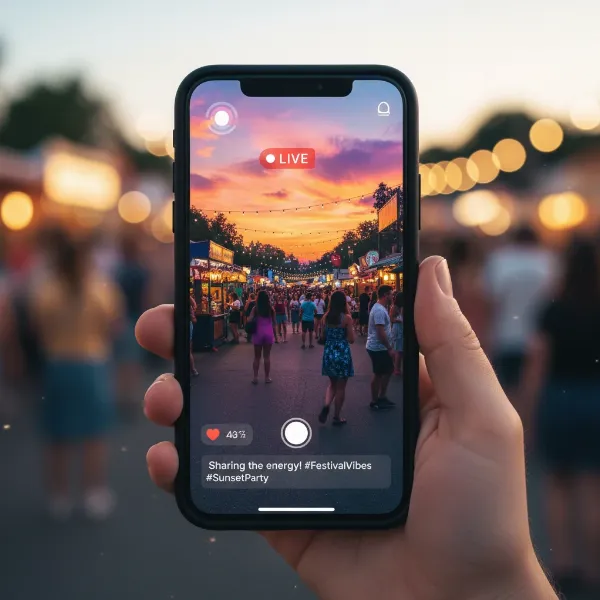 A person holding a smartphone vertically, capturing content for TikTok or Reels, showcasing mobile-first creation.
- Dedicated Vertical Vlog Cameras (e.g., Sony ZV-1F): Sony’s ZV series, particularly the ZV-1F, is designed with vloggers in mind, offering features like native vertical shooting capabilities and easy smartphone transfer. These cameras simplify the workflow by providing true vertical video capture without the need for post-production rotation, making them a game-changer for creators focused solely on vertical platforms.
- Action Cameras (e.g., GoPro HERO13 Black): For rugged, dynamic, or action-packed vertical content, GoPro cameras are top contenders. They offer excellent image stabilization (like HyperSmooth 6.0), high frame rates for slow-motion, and often include “crop-safe” guides to help frame horizontal shots for later vertical cropping. Their compact size and durability are perfect for on-the-go shooting.
- Mirrorless Cameras (e.g., Sony A7S III, Canon EOS R5): For professional-grade vertical content, mirrorless cameras offer superior image quality, low-light performance, and lens versatility. While they often require external accessories like vertical camera cages, L-brackets, or specialized gimbals (like the DJI Pocket 3 with its built-in gimbal) to shoot natively vertical, their ability to capture high-resolution 4K footage allows for flexible cropping in post-production.
- 360 Cameras (e.g., Insta360 X5): These cameras provide unparalleled creative freedom. By capturing an entire 360-degree sphere of footage (e.g., 8K 360), you can reframe and export any desired vertical aspect ratio in post-production. This means you don’t have to worry about framing while shooting, simply capturing the moment and deciding the best vertical composition later.
Best Practices and Tips for Vertical Shooting
Mastering vertical shooting involves more than just turning your camera. It requires a nuanced understanding of composition, pacing, and platform specifics.
- Hook Viewers Immediately: The first 1-6 seconds are crucial. Start with a strong visual, a compelling question, or an intriguing action to grab attention and prevent users from scrolling past. Avoid lengthy intros or unnecessary lead-ins.
- Center Your Subject: With the narrow vertical frame, keeping your main subject (often a person) centered is typically effective. This ensures they remain the focal point and are easily viewable on mobile screens.
- Embrace the Vertical Frame: Think vertically during composition. Utilize leading lines that ascend or descend, play with depth, and be mindful of how elements are stacked within the frame. Avoid wide focal lengths too close to your subject to prevent unnatural distortion.
- Prioritize Excellent Audio: Clear, crisp audio is as important as visuals. Use external microphones whenever possible, especially for dialogue or narration. Bad audio can quickly disengage viewers.
- Utilize Platform Features (Strategically): While powerful editing can be done externally, leverage in-app sounds, trending music, text overlays, and filters to enhance your content’s native feel and appeal to the platform’s algorithm.
- Optimize for Readability: If using text overlays, ensure they are large, clear (sans-serif fonts work well), and positioned in areas of the screen that won’t be covered by UI elements. Avoid cluttered backgrounds that distract from text.
- Stable Footage is Key: Handheld, shaky footage can be jarring. Whenever possible, use a tripod, gimbal, or rely on a camera’s built-in stabilization to produce smooth, professional-looking clips.
- Consider Content Length: While the “shorter is better” rule (7-34 seconds) has been prevalent, some experts predict a shift towards slightly longer vertical content. Experiment with different lengths to see what resonates best with your audience and content type.
- Mind Your Lighting: Good lighting enhances professionalism. Natural light is often best, but ring lights or softboxes can provide consistent illumination, especially for indoor or self-shot content. Avoid strong backlighting that silhouettes your subject.
Essential Accessories for Vertical Shooting
Beyond the camera itself, several accessories can significantly enhance your vertical video production quality and workflow.
- Vertical Camera Cage or L-Bracket: For mirrorless or DSLR cameras, a vertical cage or L-bracket allows you to mount the camera securely in a 9:16 orientation to a tripod or gimbal, ensuring balance and access to controls.
- Gimbals and Stabilizers: These are crucial for smooth, cinematic vertical footage, especially when moving. Options range from smartphone gimbals (like the DJI Osmo Mobile series) to professional camera gimbals that can handle the vertical rotation of larger cameras. The DJI Pocket series even offers built-in gimbals and native vertical shooting.
- External Microphones: A dedicated microphone, such as a lavalier (lapel mic), shotgun mic, or wireless system, will dramatically improve audio quality compared to most in-camera microphones.
- Portable LED Lighting: Ring lights, small LED panels, or softboxes are excellent for adding professional lighting, especially for close-up shots or vlogging, ensuring your subject is well-lit.
- Tripods and Stands: A sturdy tripod is essential for static shots, interviews, or self-shot content. Flexible tripods like GorillaPods are versatile for mounting cameras in various vertical positions.
- Extra Batteries and Chargers: Shooting video, especially in 4K, drains batteries quickly. Always have several spare batteries and a portable charger on hand to avoid interruptions.
- High-Capacity Memory Cards: Vertical video, particularly in high resolution, consumes significant storage space. Fast, high-capacity SD cards or microSD cards are a must.
- Power Bank for Smartphones: If using your phone, a high-capacity power bank will keep you charged throughout your shooting sessions.
Conclusion
Vertical shooting mode is no longer merely an option; it’s an indispensable element for anyone serious about engaging audiences on TikTok, Instagram Reels, and other mobile-first platforms. From its seamless fit with smartphone usage to its immersive, full-screen impact, the vertical format offers a direct pathway to connect with viewers in their natural digital habitat. While it presents unique challenges in composition and editing, understanding the technology, choosing the right tools, and applying best practices can transform your content into a compelling visual narrative. By embracing vertical shooting mode, you’re not just following a trend; you’re adopting the language of modern digital storytelling, ensuring your message resonates powerfully with today’s mobile generation.
What creative ways will you utilize vertical shooting to tell your next story?
Frequently Asked Questions
Is vertical shooting mode absolutely necessary for TikTok and Reels?
While not strictly “mandatory” for every single piece of content, shooting vertically (9:16 aspect ratio) is highly recommended and widely considered essential for optimal performance on TikTok and Instagram Reels. These platforms are designed for full-screen vertical viewing, and content that doesn’t fit this format often receives less engagement and may be penalized by algorithms.
Can I use my existing camera to shoot vertical videos?
Yes, most cameras can be adapted for vertical video. Smartphones inherently shoot vertically. For mirrorless or DSLR cameras, you can physically rotate the camera 90 degrees and use accessories like L-brackets or gimbals designed for vertical mounting. Alternatively, shooting in 4K horizontal allows for significant cropping into a vertical frame in post-production.
What is the ideal aspect ratio for TikTok and Reels?
The ideal aspect ratio for both TikTok and Instagram Reels is 9:16. This tall, narrow orientation fills the entire screen of a vertically held smartphone, providing the most immersive and engaging viewing experience for users on these platforms.
How do I make my vertical videos stand out?
To make your vertical videos stand out, focus on a strong visual hook in the first few seconds, keep your main subject centered, ensure excellent audio quality, and use clear text overlays. Leverage trending sounds and in-app features where appropriate, and experiment with dynamic pacing to maintain viewer interest.
Are there any specific composition rules for vertical video?
Yes, vertical composition differs from horizontal. Emphasize vertical lines and depth, and frame your shots to guide the viewer’s eye up and down the screen. Be mindful of head and foot room, and avoid placing crucial information too close to the top or bottom edges, where it might be obscured by platform UI elements.