Ever taken your drone up on a beautiful, sunny day, captured what you thought was epic footage, only to get home and find it looks… jittery and weirdly amateur? You’re not alone. The culprit is often too much light, forcing your drone’s camera into a super-fast shutter speed. This is precisely the problem that learning How To Use Nd Filters On A Drone solves, and it’s the single biggest step you can take to elevate your aerial videography from a hobbyist’s clip to a cinematic masterpiece.
Think of ND filters as sunglasses for your drone’s camera. They don’t change the colors, but they reduce the amount of light hitting the sensor. This simple function gives you back creative control, allowing you to master motion blur and produce the silky-smooth footage you see in professional films.
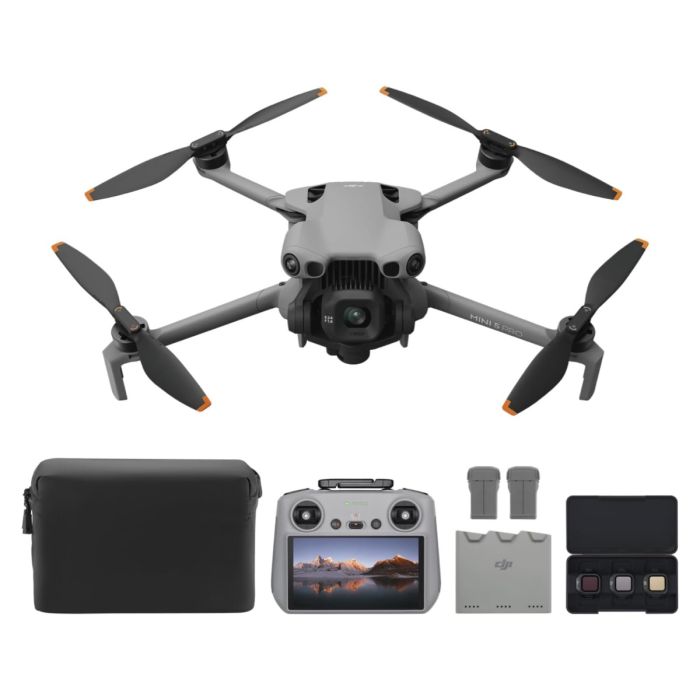
What Exactly Are ND Filters and Why Do You Need Them?
An ND, or Neutral Density, filter is a piece of darkened glass or resin that you attach to your drone’s camera lens. Its job is to cut down on the intensity of light without affecting the color or hue of the scene. They come in various strengths, labeled with numbers like ND4, ND8, ND16, ND32, and so on. The higher the number, the darker the filter and the more light it blocks.
So, why is blocking light so important? It all comes down to controlling your shutter speed. In bright daylight, your drone’s camera, if left on auto, will use an extremely fast shutter speed (like 1/1000s or faster) to prevent the image from being overexposed or “blown out.” While this creates a sharp, properly exposed image for photography, it’s a disaster for video. A super-fast shutter speed captures every tiny movement with crisp precision, resulting in a choppy, stuttering effect that looks unnatural to the human eye.
By attaching an ND filter, you force the camera to use a slower shutter speed to achieve the correct exposure. This slower shutter speed introduces a subtle, natural-looking motion blur, which is the secret ingredient for smooth, cinematic video.
The Secret Sauce: Understanding the 180-Degree Rule
Before we dive into the practical steps, you need to understand the “why” behind it all. The guiding principle for cinematic motion blur is the 180-Degree Rule.
The 180-Degree Rule is a classic filmmaking guideline that states your shutter speed should be double your frame rate (or as close as possible).
This might sound technical, but it’s super simple in practice:
- If you’re shooting at 24 fps (frames per second), your ideal shutter speed is 1/50s.
- If you’re shooting at 30 fps, your ideal shutter speed is 1/60s.
- If you’re shooting at 60 fps (for slow motion), your ideal shutter speed is 1/120s.
Trying to achieve a slow 1/50s shutter speed on a sunny day without an ND filter is impossible; your footage would be a completely white, overexposed mess. This is where the filters become non-negotiable. They are the tool that lets you lock in your shutter speed according to the 180-Degree Rule, no matter how bright it is outside.
A Practical Guide on How to Use ND Filters on a Drone
Alright, theory’s over. Let’s get these filters on your drone and start shooting. This step-by-step guide will walk you through the entire process.
Step 1: Choose the Right Filter Strength
This is the most common question, and the answer depends entirely on the lighting conditions. You can’t just stick one filter on and hope for the best. Most filter kits come with a range, typically from ND4 to ND64.
Here’s a general cheat sheet to get you started:
- ND4 (2-Stop): Best for overcast, cloudy days or golden hour (sunrise/sunset).
- ND8 (3-Stop): Good for partly cloudy days or when the sun is not too harsh.
- ND16 (4-Stop): Your go-to filter for standard, bright sunny days. This is often the most used filter.
- ND32 (5-Stop): For very bright, direct sunlight, especially over reflective surfaces like water or snow.
- ND64 (6-Stop): For extremely bright conditions, like midday sun in a desert or over a bright, snowy landscape.
Pro Tip: It’s always better to have a full set. Lighting can change quickly, and being able to swap filters is key to getting the perfect shot.
Step 2: Set Your Camera to Manual Mode
You can’t properly use ND filters if your camera is fighting you on auto settings. Before you even take off, go into your drone’s flight app (like DJI Fly) and switch your camera settings to Manual or Pro mode.
- Set your ISO to 100. This is the lowest native ISO for most drones and will give you the cleanest image with the least amount of digital noise.
- Set your frame rate. For a cinematic look, choose 24fps or 30fps.
- Set your shutter speed. Following the 180-Degree Rule, set your shutter to double your frame rate (e.g., 1/50s for 24fps). Lock this in. This is the value you will not change.
Step 3: Attach the Filter Before Powering On
This is a crucial mechanical step. Your drone’s gimbal is a delicate piece of machinery. Attaching or removing a filter while the drone is powered on can put stress on the gimbal motors as they try to stabilize. Always attach your chosen ND filter while the drone is turned off.
Step 4: Power On and Check Your Exposure
Once the drone is on and connected, look at your screen. Your goal is to see if the image is properly exposed with your locked-in shutter speed and the ND filter you chose. The best tool for this is your exposure value (EV) indicator or histogram.
- EV Meter: This is usually a small number on your screen. You want it to be as close to 0.0 as possible. A negative number (-0.3, -0.7) means it’s slightly underexposed, which is often preferable as it’s easier to recover details from shadows than from blown-out highlights.
- Histogram: This graph shows the tonal range of your image. A well-balanced histogram won’t be bunched up against the far left (too dark) or far right (too bright).
Step 5: Adjust and Fly
What if your image is too bright (EV is +1.0) or too dark (EV is -1.3)? You have to change the filter. This can feel tedious, but it’s part of the process.
- If the image is too bright, you need a stronger (darker) ND filter. Land the drone, power it off, and swap your ND16 for an ND32.
- If the image is too dark, you need a weaker (lighter) ND filter. Land, power off, and swap your ND16 for an ND8.
Once your exposure is dialed in at 0.0 or just under, you’re ready to fly and capture that buttery-smooth footage.
“New pilots often think of ND filters as an accessory. Pros think of them as a necessity. Don’t leave home without them. The best advice I can give is to spend a full afternoon just practicing—landing, swapping filters, and taking off again. Soon it becomes second nature.”
— Alex Jensen, Professional Aerial Cinematographer
Are ND and Polarizing (PL) Filters the Same Thing?
No, they serve different purposes, though they can be combined. A PL (Polarizing) filter is designed to reduce glare and reflections from surfaces like water, glass, and even leaves. It also enhances color saturation, making blue skies and green foliage pop.
Many manufacturers, like PolarPro and Freewell, offer hybrid ND/PL filters. These are fantastic all-in-one solutions that both reduce the amount of light (the ND part) and cut down on glare (the PL part), giving you the best of both worlds in a single filter.
Frequently Asked Questions
Which ND filter should I use for a sunny day?
For a typical bright, sunny day, an ND16 is the perfect starting point. If you are flying in extremely bright conditions, such as midday over a beach or snow, you will likely need to step up to an ND32 or even an ND64 to maintain your target shutter speed.
Can I use ND filters for drone photography?
Yes, you can! While their primary benefit is for video motion blur, ND filters are essential for long-exposure photography with a drone. By using a strong filter (like an ND1000), you can slow your shutter speed down to several seconds, allowing you to capture smooth, misty water or light trails from moving cars.
Do I really need ND filters as a beginner?
If your goal is to create cinematic-looking videos, then yes. Even as a beginner, learning how to use ND filters on a drone is a fundamental skill. It’s one of the most significant factors that separates casual, choppy-looking footage from smooth, professional-quality aerial shots.
How do I clean my ND filters?
Always use a microfiber cloth to gently wipe away fingerprints and dust. For more stubborn smudges, you can use a lens cleaning solution. Clean filters are critical, as any dirt or smudges will be very noticeable in your footage, especially when flying towards the sun.
What happens if I forget to use an ND filter in bright sun?
If you forget a filter and want to properly expose your shot, your drone’s camera will have to use a very high shutter speed (e.g., 1/1000s). While the exposure might look okay, the resulting video will lack natural motion blur, making it appear jittery and stuttery, especially during panning or fast movements.
Conclusion
Getting to grips with ND filters may seem like one more technical hurdle to overcome, but it’s a journey worth taking. They are not just an accessory; they are a fundamental tool for unlocking your drone’s creative potential. By understanding the 180-Degree Rule and practicing the simple steps of choosing, setting up, and adjusting, you’ll gain complete control over the look and feel of your aerial videos.
So, invest in a quality set of filters, put your camera in manual mode, and start experimenting. Mastering how to use ND filters on a drone is your ticket to transforming bright, harsh sunlight from an obstacle into an opportunity for stunning, cinematic storytelling.