As an avid drone enthusiast, you understand that capturing breathtaking 4K aerial footage requires more than just a high-quality drone camera. The unsung hero behind those smooth, cinematic shots is often the humble microSD card. An inadequate card can lead to frustrating dropped frames, corrupted files, and missed opportunities to capture that perfect moment. This comprehensive guide will equip you with the knowledge to select the ideal microSD card, ensuring your drone’s 4K capabilities are fully unleashed.
Understanding MicroSD Cards: The Backbone of Your Drone’s Camera
MicroSD cards are tiny powerhouses designed for devices with limited space, such as drones, action cameras, and smartphones. While they might look similar, their internal specifications vary significantly, directly impacting their performance. For 4K drone footage, you need a card capable of handling a massive amount of data being written continuously and at high speeds. Unlike still photography, which writes data in bursts, video recording demands a consistent, sustained write speed to prevent any interruptions or loss of data quality.
Decoding Key Specifications for Flawless 4K Drone Footage
Choosing the best microSD card for 4K drone footage hinges on understanding a few critical specifications. These markings, often found on the card itself, indicate its performance capabilities.
Speed Class: Ensuring Consistent Write Performance
The most crucial factor for 4K video recording is the card’s sustained write speed. This is measured by several speed class ratings:
- UHS Speed Class (U1, U3): Denoted by a “U” with a number inside.
- U1 guarantees a minimum sustained write speed of 10MB/s, generally sufficient for Full HD video.
- U3 guarantees a minimum sustained write speed of 30MB/s, which is the absolute minimum recommended for standard 4K video recording.
- Video Speed Class (V10, V30, V60, V90): This class is specifically designed for video recording, providing a clearer indication of sustained write speeds.
- V30 (30MB/s): Recommended for standard 4K (up to 30fps) video capture. Most modern drones shooting 4K will require at least a V30 card.
- V60 (60MB/s): Ideal for higher frame rate 4K (e.g., 4K/60fps) and HDR video, offering a significant buffer for demanding footage.
- V90 (90MB/s): The top-tier choice for professional-grade 4K, 6K, or even 8K video, as well as ProRes workflows, providing maximum reliability and performance.
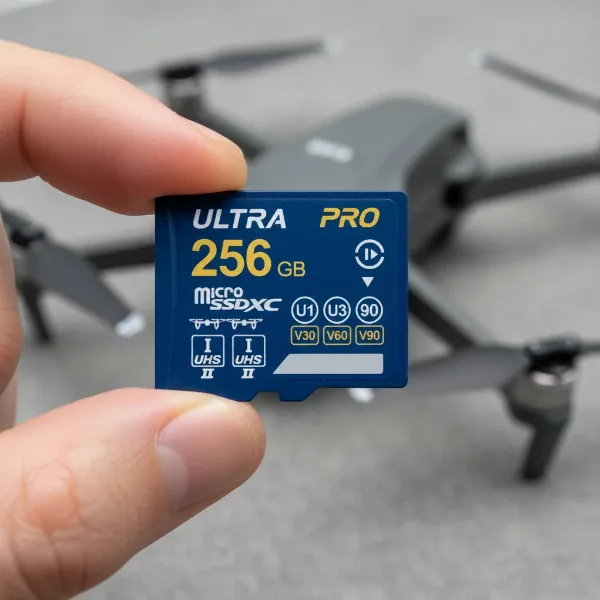 Close-up of a microSD card showing speed class, video speed class, and UHS interface markings.
UHS Interface: Speeding Up Data Transfer
MicroSD cards utilize different bus interfaces for data transfer, primarily UHS-I and UHS-II.
- UHS-I: The most common interface, featuring a single row of contact pins. It offers excellent performance for most 4K drone recording needs, with theoretical speeds up to 104MB/s.
- UHS-II: Distinguished by a second row of pins, UHS-II cards boast significantly faster theoretical speeds, up to 312MB/s. While this rarely translates to faster in-flight recording (as most drones support UHS-I internally), it drastically improves the read speed for offloading footage to your computer, saving you valuable time during post-production. Ensure your drone and card reader support UHS-II to take full advantage of its benefits.
Capacity: How Much Footage Can You Store?
4K video files are notoriously large, consuming storage space rapidly. The capacity you need depends on your typical flight duration, resolution, frame rate, and compression settings. As a general guideline:
- 4K video recorded at 100Mbps (megabits per second) consumes approximately 375MB (megabytes) per minute.
- 64GB cards: Suitable for shorter flights or casual users who offload footage frequently.
- 128GB cards: The “sweet spot” for many drone enthusiasts, offering a good balance of storage and cost.
- 256GB cards and above: Recommended for professional videographers, extended shooting sessions, or when you can’t frequently offload footage.
Consider your workflow and how often you’re willing to swap cards during a shoot.
Durability: Built for Aerial Adventures
Drones operate in diverse and sometimes challenging environments, so your microSD card needs to be robust. Look for cards that are:
- Temperature-proof: To withstand extreme heat or cold.
- Waterproof: In case of unexpected splashes or moisture exposure.
- Shockproof: To survive minor bumps and drops.
- X-ray proof: Essential for worry-free travel through airport security.
Application Performance Class (A1/A2): An Added Benefit
While primarily designed to enhance app performance on Android devices, the A1 and A2 ratings indicate better random read/write performance. Though not critical for continuous video recording, an A2 rating suggests a higher overall quality card.
Top Recommended MicroSD Cards for 4K Drone Footage
Based on performance, reliability, and widespread compatibility with popular drones, here are some of the best microSD cards for capturing stunning 4K aerial video:
| Brand | Model | Key Specs | Ideal Use Case |
|---|---|---|---|
| SanDisk | Extreme Pro | UHS-I U3 V30 A2 (up to V90) | Professional 4K/60fps, high-bitrate recording. Top-tier. |
| SanDisk | Extreme | UHS-I U3 V30 A2 | Excellent value for smooth 4K/30fps and general use. |
| Samsung | PRO Plus | UHS-I U3 V30 A2 | Reliable performance, especially durable for outdoor use. |
| Lexar | Professional 1066x | UHS-I U3 V30 A2 | Strong performance and good read/write balance. |
| Kingston | Canvas Go! Plus | UHS-I U3 V30 A2 | Great value for 4K video and high-speed photos. |
| Kingston | Canvas React Plus | UHS-II U3 V90 A1 | For drones supporting UHS-II, ideal for 4K/60fps and 8K. |
Many drone manufacturers, such as DJI, provide lists of recommended microSD cards for their specific models. Always consult your drone’s manual or the manufacturer’s website to ensure full compatibility and optimal performance.
How to Choose the Right MicroSD Card for Your Drone
Selecting the perfect card isn’t a one-size-fits-all decision. Consider these factors:
- Match Card Speed to Drone Bitrate: Your drone’s camera records video at a certain bitrate (e.g., 120 Mbps). Convert this to MB/s (120 Mbps / 8 = 15 MB/s) and choose a card with a sustained write speed that exceeds this value, ideally with some headroom. For example, a V30 card offers 30 MB/s, which is well above 15 MB/s, preventing dropped frames. For 4K/60fps or higher bitrates, a V60 or even V90 card might be necessary.
- Evaluate Your Shooting Needs: Do you take short, casual flights or lengthy, professional shoots? This will dictate your required storage capacity.
- Check Drone Compatibility: Always refer to your drone’s official specifications for maximum supported capacity and recommended speed classes. Using a card that exceeds the drone’s specifications won’t necessarily yield better results and might even cause issues.
- Prioritize Trusted Brands: Stick to reputable brands known for quality and reliability to minimize the risk of data loss.
- Read Reviews: Look for reviews from other drone pilots using the same or similar drone models.
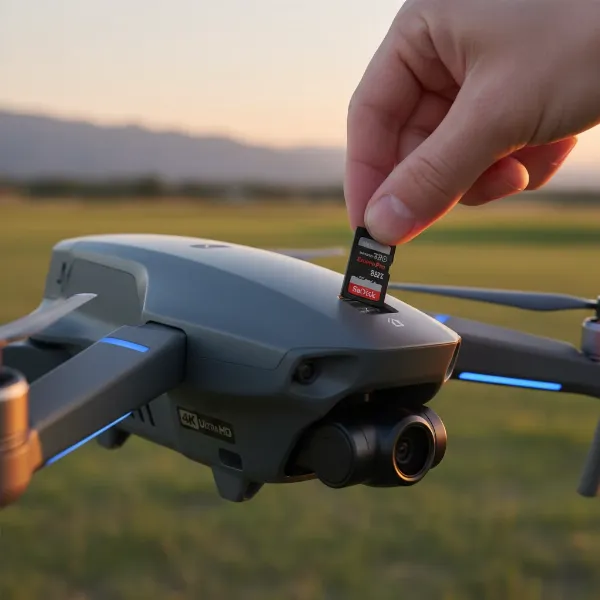 Hand inserting a microSD card into a drone, illustrating the process of choosing and using the right card.
Tips for Maintaining Your Drone’s MicroSD Card
A high-performance microSD card deserves proper care to ensure its longevity and reliable operation.
- Regularly Format Your Card: Formatting the card within your drone periodically helps maintain file system integrity and clears out any fragmented data, ensuring optimal recording performance. Avoid simply deleting files.
- Safely Eject and Insert: Always power off your drone before inserting or removing the microSD card to prevent data corruption.
- Backup Your Footage: Transfer your precious 4K footage to a computer or external hard drive immediately after your flights. Don’t rely solely on the microSD card for long-term storage.
- Store in a Protective Case: Keep spare cards in a dedicated, anti-static case to protect them from dust, moisture, and physical damage.
Conclusion
Choosing the best microSD card for your 4K drone footage is a critical decision that directly impacts the quality and reliability of your aerial videography. By understanding speed classes like V30 and V60, considering adequate capacity, prioritizing durability, and opting for trusted brands, you can ensure your drone captures every stunning detail without a hitch. Don’t let a subpar microSD card be the weakest link in your aerial filmmaking setup. Invest wisely, and prepare to elevate your drone footage to new heights.
What exhilarating 4K drone adventures will you capture with your perfectly matched microSD card?
Frequently Asked Questions
What is the difference between V30 and V60 speed classes?
The “V” in V30 and V60 stands for Video Speed Class, indicating the card’s minimum sustained write speed. A V30 card guarantees a minimum of 30MB/s, suitable for standard 4K video. A V60 card guarantees 60MB/s, making it ideal for more demanding 4K footage, especially at higher frame rates like 4K/60fps, or for HDR video.
Do all drones support UHS-II microSD cards?
No, not all drones support UHS-II cards. While UHS-II cards offer faster theoretical speeds (especially for read performance), many drones are designed to work with the UHS-I interface. Always check your drone’s manufacturer specifications to confirm if it supports UHS-II before purchasing, as you might not benefit from the increased speed if your drone doesn’t utilize it.
How often should I format my microSD card for drone use?
It’s a good practice to format your microSD card after every major shoot or at least once a month if you fly frequently. Formatting cleans the card, removes fragmented files, and optimizes its performance. Always back up your data before formatting, as it will erase all content on the card.
What happens if I use a slow microSD card for 4K drone footage?
Using a microSD card with insufficient write speed for 4K drone footage can lead to several issues. The most common problems include dropped frames, resulting in choppy or stuttering video, recording errors, or even corrupted files that become unplayable. This occurs because the drone is trying to write data faster than the card can handle.